

Shifting from ‘exporting power’ to ‘smart self-consumption’
Solar panels and the home battery: what is the real return on investment?
The dynamics surrounding solar energy have shifted dramatically. Where we used to blindly feed as much power as possible back into the grid, we are now looking at a completely different landscape. While the net metering scheme (salderingsregeling) is still active this year, energy providers have already introduced grid fee penalties for exporting electricity. And next year? The net metering scheme will definitively change, making the future of the energy market highly unpredictable. From 2027 onwards, our energy provider will pay out a net amount of just €0.05945 per exported kWh. Meanwhile, when you purchase electricity (even if it was generated during the day), you pay around €0.26 per kWh…
In this rapidly changing world, how do you still get the maximum return from your solar panels?
Switching from ‘grid injection’ to ‘smart self-consumption’ might be your most financially attractive option.
With current feed-in penalties, exporting electricity during peak hours has often become a losing game. The new goal is to consume the power you generate immediately. However, the sun shines brightest when you are usually away from home.
This is where the home battery comes into play. Instead of sending your excess power to the grid for free (or paying a penalty for it), you store it for the evening hours. Your return on investment is no longer found in a payout from the energy provider, but in avoiding expensive electricity purchases and dodging grid feed-in fees.
ROI through smart automation: while a home battery is an excellent buffer, the real return of the future lies in intelligent management. After all, if the battery is fully charged and the sun keeps shining, you will still end up facing those export penalties.
The smart solution: by using a control system that automatically dials back your inverters as soon as your battery is full and your household consumption is low, you prevent pushing excess power onto the grid. This keeps your ‘penalties’ to an absolute minimum.
What does the future hold? Although the regulations will change next year and no one knows exactly how the market will take shape, one thing is certain: energy independence is becoming invaluable. Those who invest now in combining solar panels, a home battery, and smart software (such as dynamically managing inverters) are optimally prepared for a profitable future without net metering.
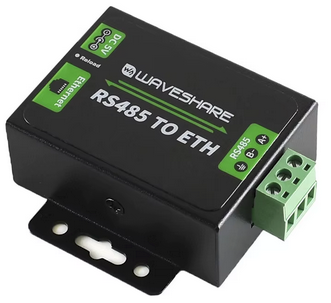
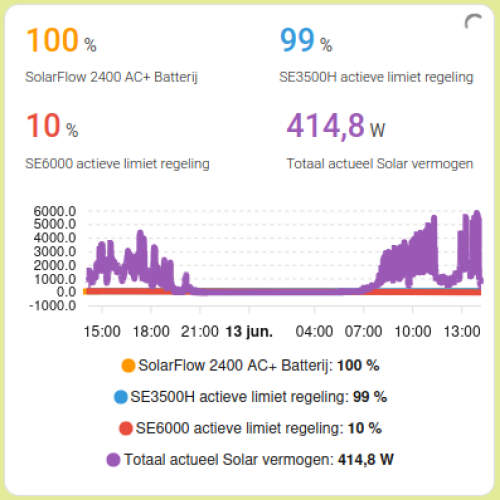
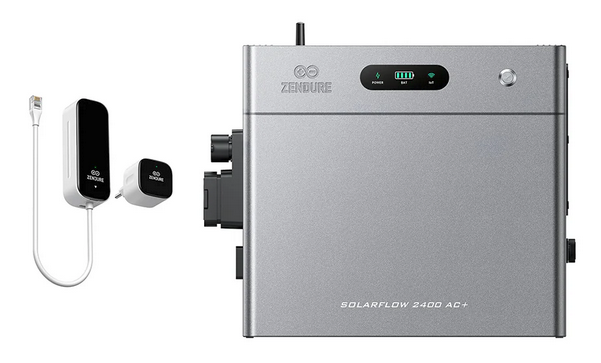
To give you an idea of how you could approach this in your own situation, below is a description of an operational installation. It consists of a Zendure SolarFlow 2400 AC+ home battery and two SolarEdge inverters, controlled via a smart cascade system in Home Assistant (available as a P1-based control version and a faster Shelly-based control version).
Hardware and Integration overview
⚡ Electrical installation
3-Phase connection distribution: the two inverters and the home battery are each connected to a separate phase. The Zendure home battery plug is connected ‘dedicated’ to a safe outlet with a separate power cable and its own residual-current circuit breaker with overcurrent protection (RCBO). The system has been fully installed in accordance with NEN 1010 regulations, taking specific account of DC leakage current protection (Type B) and the selectivity of the SolarEdge inverters relative to the main grid connection.
⚡ Inverters & generation
SolarEdge SE6000: the primary 1-phase inverter responsible for the bulk of the solar generation (afternoon sun). In the cascade, this inverter is the first to be dynamically curtailed during power surplus, down to a safe lower limit of 10% to ensure it stays online.
SolarEdge SE3500H: the secondary 1-phase inverter in the system (morning sun). As soon as the SE6000 is at its minimum and there is still excess power, this inverter is also actively curtailed in the cascade towards 0% to tightly regulate the total surplus.
🔋 Storage & energy metering
Zendure SolarFlow 2400 AC+: the home battery system that stores excess solar energy. The control system starts automatically as soon as this battery reaches 95%, leaving sufficient room for optimized trickle charging.
P1 meter (smart meter): this meter forms the direct foundation for the P1 control version. It detects in real time when the house is exporting power to the grid, after which the automation dials back the inverters using a percentage-based estimation.
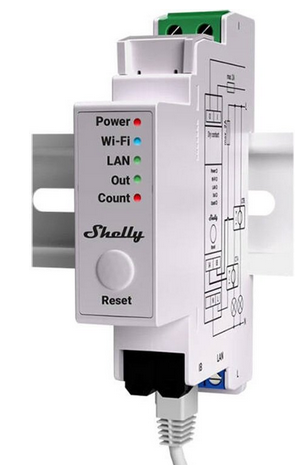
3x Shelly Pro EM50: these accurate induction clamps measure the pure, actual power (Watts) of both inverters and the battery. In the Shelly control version, this real-time data forms the direct basis for the calculation logic. Because the system knows the exact generation, the formula immediately calculates the correct curtailment step to the zero-line during partly cloudy weather, without requiring multiple adjustment cycles.
🌐 Communication & control
Waveshare RS485 to ethernet interface: the hardware bridge (gateway) that converts the serial Modbus communication of the SolarEdge SE6000 inverter into a stable IP network signal (Ethernet). The SE3500H already has Modbus communication built-in.
SolarEdge Modbus (Multi-device) Integration: the software coupling within Home Assistant. This integration communicates over the network with both inverters to read registers in real time and directly control the active power limits of both inverters live.
Dynamic Cascade control
Why this control system?
As the Zendure home battery nears full capacity (95% or more), it optimizes for trickle charging and can store less solar energy. If household electricity consumption is low at that moment, all excess solar power flows back into the grid. Given the current feed-in penalties, we want to smartly minimize this surplus to achieve a true zero-on-the-meter situation. To efficiently manage our grid export, we will dynamically curtail both SolarEdge inverters.
What exactly does this system do?
The automation checks the status of the house and the battery every 2 minutes, managing the inverters in a dynamic cascade structure. While the core logic remains identical for both setups, the way the curtailment step is calculated differs:
- With the P1 control system: the system calculates the percentage-based curtailment step using the measured P1 surplus and the maximum capacity of the inverters. This serves as an effective estimate, which sometimes requires an additional adjustment cycle to reach the zero-line.
- With the Shelly control system: the system calculates the curtailment step based on the measured P1 surplus and the actual real-time generation measured by the Shellys. Because the exact production is known, this variant instantly dials the inverters down to the correct value in one single step, even during fast-changing cloudy weather.
🔋 Battery priority & trickle charging
The inverters always run at 100% capacity as long as the Zendure battery is below 95%. Only when the battery hits 95% or higher AND a grid surplus occurs (> 0.2 kW), the system starts curtailing to leave headroom for battery management.
📉 Dynamic Cascaded curtailment
The system does not use fixed increments, but calculates the required step size in real time (depending on the chosen P1 or Shelly calculation method). A safety margin of 200 Watts is applied to prevent over-curtailing.
- First, the SE6000 inverter is dynamically scaled down to a safe lower limit of 10% (preventing the inverter from going completely offline).
- Only when the SE6000 is at its 10% minimum and power is still being exported, the system starts dynamically curtailing the SE3500 down towards 0%.
📈 Rapid scaling during power demand
As soon as the energy balance turns negative (importing electricity from the grid) OR the Zendure battery drops below 95%, generation is immediately ramped back up in powerful increments of 25%. This occurs in reverse order: first, the SE3500 is brought back to 100%, followed by the SE6000.
🔄 Startup, mode & safety reset
When manually enabling the automation, restarting Home Assistant, or toggling between demo and real mode, all limits are immediately safely reset to 100% for a clean start. The Shelly variant also includes a built-in ‘anti-freeze’ safety feature that locks the limits if the inverters are not producing power (e.g., at night), preventing mathematical division-by-zero errors.
Explanation of used variables and the downloadable code
To control these smart zero-on-the-meter systems, the automation utilizes various sensors and switches. These can be divided into general measurements, the new Shelly sensors, system switches, real inverter entities, and virtual demo entities.
1. General sensors (measurements)
sensor.huidige_netto_energiebalans => Home Assistant DSMR Smart Meter Integration
The primary indicator of the system. This sensor utilizes P1 data from the smart meter to calculate the balance between import and export.
template:
  - sensor:
      - name: "Huidige netto energiebalans"
        unique_id: huidige_netto_energiebalans
        state: >-
          {{ (states('sensor.electricity_meter_energieproductie') | float(0)) -
             (states('sensor.electricity_meter_energieverbruik') | float(0)) }}
        unit_of_measurement: "kW"
        device_class: power
        state_class: measurement
A positive value indicates power export (surplus), while a negative value indicates power import (household deficit).
sensor.solarflow_2400_ac_electric_level => Home Assistant Zendure Integration
Displays the current battery percentage (SoC) of the Zendure SolarFlow home battery. The system uses this to activate the trickle charge and cascade control from ≥ 95%.
2. Shelly Pro EM50 Sensors (exclusive to the Shelly control version)
- sensor.shellypro_em50_se6000_vermogen: measures the actual real-time power in Watts generated by the SE6000 inverter.
- sensor.shellypro_em50_se3500h_vermogen: measures the actual real-time power in Watts generated by the SE3500H inverter.
- sensor.shellypro_em50_thuisbatterij_vermogen: measures the current power flowing to and from the home battery (a negative value indicates charging, a positive value indicates discharging).
=> Home Assistant Shelly Integration
The real-time Watt measurements of the inverters are used in the Shelly control system to calculate the exact percentage-based curtailment step, eliminating the need for the system to guess based on maximum capacity.
3. System switches & automations
input_boolean.solar_limiet_regeling_actief
input_boolean:
  solar_limiet_regeling_actief:
    name: "Limiet regeling mode: demo/actief"
    icon: mdi:home-lightning-bolt
The main switch on the dashboard to toggle between simulation and reality. When this switch is set to on (real mode), the automations control the actual hardware inverters. When set to off (demo mode), a safe virtual simulation runs on the dashboard.
automation.solar_cascade_p1_regeling & automation.solar_cascade_shelly_regeling
The two core automations. As soon as either of these control systems is manually enabled, it triggers a startup reset that immediately and safely restores all inverter limits (and demo sliders) back to 100% for a clean start.
4. Inverter entities - real mode
- number.se6000_i2_active_power_limit: the active power limit of the SolarEdge SE6000. This is the first inverter to be curtailed, down to a hard lower limit of 10% to keep the inverter online.
- number.se3500_i1_active_power_limit: the active power limit of the SolarEdge SE3500H. This follows next in the cascade and curtails down toward 0% once the SE6000 is already at its minimum limit.
- button.se6000_i2_commit_power_settings & button.se3500_i1_commit_power_settings: SolarEdge requires power limits to be explicitly saved via Modbus after a modification. These virtual buttons are automatically ‘pressed’ by the automations to immediately write and apply the new limits to the hardware.
=> Home Assistant SolarEdge Modbus Multi Integration
5. Virtual entities - demo mode
input_number.demo_se6000_active_power_limit & input_number.demo_se3500_active_power_limit
Simulated sliders that mimic the inverter limits on the dashboard when demo mode is active. When real mode is enabled, these sliders automatically synchronize with the real inverters in the background, ensuring the dashboard always reflects the live status.
input_number:
  demo_se6000_active_power_limit:
    name: "Solar demo SE6000 limiet regeling"
    min: 0
    max: 100
    step: 1
    unit_of_measurement: "%"
    icon: mdi:speedometer
    mode: slider

  demo_se3500_active_power_limit:
    name: "Solar demo SE3500H limiet regeling"
    min: 0
    max: 100
    step: 1
    unit_of_measurement: "%"
    icon: mdi:speedometer
    mode: slider
Downloads
This is just one of many possible solutions. Hopefully, it helps get you started and provides you with some inspiration!